NOTE: These files may also be deleted by spywares. You may need to extract them using Windows CD.
Steps for rectifying this problem:
Log on to a networked computer.
Run Regedit.exe
Point your cursor to HKEY_LOCAL_MACHINE
Select File > Connect Remote Registry
Type computer name (infected computer)
Navigate to the following location in registry of destination or infected computer
Change these two values to
Shell=explorer.exe
Userinit = x:\windows\system32\userinit.exe
Exit from Registry
Restart Infected computer.
You should be able to log on to computer.
if it not work then go to back steps and just copy orwrite the file userinit.exe
Let me explain what happen with ur computer (why u cant login into ur windows account).
1) u got a virus 2) it copied itslef, or it made a copy simmilar name to itself into ur WINDOWS/system32 3) it cahnged the registry key: HKEY_LOCAL_MACHINE \ SOFTWARE \ Microsoft \ WindowsNT \ CurrentVersion \ Winlogon, and instead "Userinit.exe", it wrote its name
So, heres an example:
1) u got a virus, for an example, "winupdate86.exe" 2) it made a copy inside system32 as "winlogon86.exe" 3) changed registry key, and in entry putted "winlogon86.exe"
So, ur computer actualy loged on via virus, all time until ur antivirus deleted it (after that u couldnt be able to login). After ur antivurs detected and removed the virus( both "winupdate86.exe" and "winlogon86.exe") ur windows continues to look for "winlogon86.exe", couse it is on current place in registry,and its all it knowsto look for, when it try to login.
So, to solve the problem u need to (SOLUTION!!!)
1) only way to recover ur login is to find a copy of "userinit.exe" file (from XP DVD, from another computer...) 2) rename it to be as name of virus u had (u maybe dont know it, couse ur antivirus deleted it, but if u know u llbe able to fix ur login). So, sopy of "userinit.exe" rename to "winlogon86.exe" 3) put new renamed copy into ur system32 (Ofc, u dont have windows on ur computer, couse u cant login, but ucan plug off hard disk and plugin it to another computer. Other solution is if u can make bottable USB or Floppy disk DOS, and use simple copy function. 3th solution is if u have another operative system on ur computer, and manage coping there) 4) login ur windows normaly (now after u tricked ur regystry key, it still looks for same entry when it login, which was name of virus. But trick is u made a copy of real userinit.exe, and renamed to trick registry) 5) find via regedit HKEY_LOCAL_MACHINE \ SOFTWARE \ Microsoft \ WindowsNT \ , and instead name of virus, put "userinit.exe"
Thats all, ofc if u still have virus would be great if u write its name before ur Antivirus delete.. If u still know it, just do steps. If u dont know actual name of virus u can do steps, but not gonna help u. Couse u need to know whats written in entry HKEY_LOCAL_MACHINE \ SOFTWARE \ Microsoft \ WindowsNT \ . I found alctual name of my antivirus in way I go to search files inside my WINDOWS folder. And after it finished, I sorted all files with Modified Date, and Created Date... I found all files of virus in my system32... Deleted them and I had this problem... but after I saw all u people worte here I knew how to fix. Ofc I was lucky cuz I before deleting them, made a carantine. So I knew names. And with another comuter fixed.
Process name: Host Process for Services Product: Windows Company: Microsoft File: svchost.exe
"Svchost.exe" (Generic Host Process for Win32 Services) is an integral part of Windows OS. It cannot be stopped or restarted manually. This process manages system services that run from dynamic link libraries (files with extension .dll). Examples for such system services are: "Automatic Updates", "Windows Firewall", "Plug and Play", "Fax Service", "Windows Themes" and many more. At startup, Svchost.exe checks the services portion of the registry and constructs a list of services that it needs to load. Under normal conditions, multiple instances of Svchost.exe will be running simultaneously. Each Svchost.exe session can contain a grouping of services, so that many services can be run depending on how and where Svchost.exe is started. This allows for better control and debugging. If the process svchost.exe uses high cpu resources, it is mostly due because the service "Automatic Updates" is downloading some new Windows update. But having a 99% or 100% cpu usage could be caused by downloads due of some hidden malware on your computer. Some malware like the Conficker worm changes the Windows Registry so that svchost loads the malware .dll file. In this case you only see the authentic svchost.exe process in the task manager! See also: Microsoft reference
Note: The svchost.exe file is located in the folder C:\Windows\System32. In other cases, svchost.exe is a virus, spyware, trojan or worm! Check this with Security Task Manager.
When searching for a virus name, you should be aware of the naming conventions used by Symantec/Norton AntiVirus. Virus names consist of a Prefix, a Name, and often a Suffix.
The Prefix denotes the platform on which the virus replicates or the type of virus. A DOS virus usually does not contain a Prefix.
The Name is the family name of the virus.
The Suffix may not always exist. Suffixes distinguish among variants of the same family and are usually numbers denoting the size of the virus or letters.
PREFIXES
A2KM
Access macro viruses that are native to Access 2000.
A97M
Access macro viruses that are native to Access 97.
AM
Access macro viruses that are native to Access 95
AOL
Trojan horses that are specific to America Online environments and usually steal AOL password information
BAT
Batch file threats.
Backdoor
Threats may allow unauthorized users to access your computer across the Internet.
Bloodhound
Bloodhound is the name of the Norton AntiVirus heuristic scanning technology for detecting new and unknown viruses
DDos
Distributed Denial of Service threats. Distributed Denial of Service involves using zombie computers in an attempt to flood an Internet site with traffic.
DoS
Denial of Service threats. Not to be confused with DOS viruses, which are named without prefixes.
HLLC
High Level Language Companion viruses. These are usually DOS viruses that create an additional file (the companion) to spread.
HLLO
High Level Language Overwriting viruses. These are usually DOS viruses that overwrite host files with viral code.
HLLP
High Level Language Parasitic viruses. These are usually DOS viruses that attach themselves to host files.
HLLW
A worm that is compiled using a High Level Language. (NOTE: This modifier is not always a prefix, it is only a prefix in the case of a DOS High Level Language Worm. If the Worm is a Win32 file, the proper name would be W32.HLLW.)
HTML
Threats that target HTML files.
IRC
Threats that target IRC applications.
JS
Threats that are written using the JavaScript programming language.
Java
Viruses that are written using the Java programming language.
Linux
Threats that target the Linux operating system.
O2KM
Office 2000 macro viruses. May infect across different types of Office 2000 documents.
O97M
Office 97 macro viruses. May infect across different types of Office 97 documents.
OM
Office macro viruses. May infect across different types of Office documents.
PWSTEAL
Trojan horses that steal passwords.
Palm
Threats that are designed to run specifically on the Palm OS.
Trojan/Troj
These files are not viruses, but Trojan horses. Trojan horses are files that masquerade as helpful programs, but are actually malicious code. Trojan horses do not replicate.
UNIX
Threats that run under any UNIX-based operating system.
VBS
Viruses that are written using the Visual Basic Script programming language.
W2KM
Word 2000 macro viruses. These are native to Word 2000 and replicate under Word 2000 only.
W32
32-bit Windows viruses that can infect under all 32-bit Windows platforms.
W95
Windows 95 viruses that infect files under the Windows 95 operating system. Windows 95 viruses often work in Windows 98 also.
W97M
Word 97 macro viruses. These are native to Word 97 and replicate under Word 97 only.
W98
Windows 98 threats that infect files under the Windows 98 operating system. Will only work in Windows 98.
WM
Word macro viruses that replicate under Word 6.0 and Word 95 (Word 7.0). They may also replicate under Word 97 (Word 8.0), but are not native to Word 97.
WNT
32-bit Windows viruses that can infect under the Windows NT operating system.
Win
Windows 3.x viruses that infect files under the Windows 3.x operating system.
X2KM
Excel macro viruses that are native to Excel 2000.
X97M
Excel macro viruses that are native to Excel 97. These viruses may replicate under Excel 5.0 and Excel 95 as well.
XF
Excel formula viruses are viruses using old Excel 4.0 embedded sheets within newer Excel documents.
XM
Excel macro viruses that are native to Excel 5.0 and Excel 95. These viruses may replicate in Excel 97 as well.
SUFFIXES
@m
Signifies the virus or worm is a mailer. An example is Happy99 (W32.Ska), which only sends itself by email when you (the user) send mail.
@mm
Signifies the virus or worm is a mass-mailer. An example is Melissa, which sends messages to every email address in your mailbox.
dam
Indicates a detection for files that have been corrupted by a threat, or that may contain inactive remnants of a threat, causing the files to no longer be able to execute properly or produce reliable results.
dr
Indicates that the detected file is a dropper for another threat.
Family
Indicates a generic detection for threats that belong to a particular threat family based on viral characteristics.
Gen
Indicates a generic detection for threats that belong to a particular threat type based on viral characteristics.
Int
Indicates an intended threat. Threats that are intended to spread, but don't due to bugs or errors in the viral code.
Worm
Indicates a worm, not a virus. Worms make copies of themselves that they send across a network or using email, or another transport mechanism
The Trojan-Proxy.Win32 virus is a worm affecting computers running Microsoft Windows.
These Trojans function as a proxy server and provide anonymous access to the Internet from victim machines.
Today these Trojans are very popular with spammers who always need additional machines for mass mailings.
Virus coders will often include Trojan-proxies in Trojan packs and sell networks of infected machines to spammers.
You may not even know your computer has been infected. Hundreds of computers get infected daily. Simply visiting certain malicious sites can cause your computer to be infected. To find out you can try using a antivirus scanner and virus removal software.
Trojans are breaching your computer security and should be removed. The Trojan-Proxy.Win32 Trojan can be removed from your system if it has been infected!
What Exactly is the Win32 Trojan Proxy Virus
This Trojan program makes it possible for a remote malicious user to use the machine as a proxy-server.
A proxy server is a server (a computer system or an application program) which services the requests of its clients by forwarding requests to other servers. So in simple terms, the Trojan-Proxy virus uses your computer as a host to sell to spammers. Ever wondered where all your internet bandwidth has gone?
The Trojan itself is a Windows PE EXE file written in Visual C++, packed using UPX. The file can be between 39KB - 53KB in size.
An example of a Trojan horse virus would be that a program you may have downloaded which you think is something simple like a screensaver program named "exotic-cars.scr" which seems to be a car desktop screensaver. When you install it, it instead unloads hidden programs, commands, scripts, or any number of commands with or without you knowing it is doing it in the background.
Trojan Horse programs can often be used to bypass security protection you have on your system which causes you system to be left without any protect and gives the hacker full access to your machine.
What Does the Trojan-Proxy.Win32 Virus Do?
The Trojan creates a unique identifier, "Windows-Update-Service" to flag its presence in the system.
Once launched, the Trojan listens on a random TCP port to realize the proxy-server function. The number of the port chosen is randomly generated, and will be in the range 1025 - 5024. If it is not possible to listen on this port, a new attempt will be made, with the port number being regenerated.
The worm then establishes a connection to cb.im***itethinking.biz. If this is unsucessful, the attempt will be repeated at 15 minute intervals.
If the connection is successful, the number of the port which the Trojan is listening on will be encoded and transmitted to port 3878 on the server in encrypted form.
Once the remote malicious user receives this data, s/he will be able to use the victim machine as a proxy-server.
Manually Remove the Trojan-Proxy.Win32 Virus and Removing it from the Registry
Removing a virus using the manual method.
Removing a virus can be done manually, however you will need to understand how to edit the system registry and be able to troubleshoot various problems with your computer system. Viruses are persistent and removing one can take a considerable amount of time and knowledge of how an operating system works. You will also need to know how to edit registry to delete virus and stop it from reinstalling each time you connect to the internet.
Removal Instructions
1. Determine the name of the Trojan program by using regedit or another utility to edit the system registry. View the "Services" parameter in the [HKLM\Software\Microsoft\Windows\CurrentVersion\Run] key; this parameter gives the full path to the malicious program.
2. Use Task Manager to terminate the process with the Trojan name.
3. Delete the original Trojan file.
4. Delete the following value from the system registry key: [HKLM\Software\Microsoft\Windows\CurrentVersion\Run]"Services"=""
Still Having Problems Manually Removing the Win32 Virus
If you couldn't remove it for some reason try using anti-virus software
Win32 worms generally are set to run automatically when you start your computer or even register themselves to be run when any other application is started. Unfortunately, you can't just delete the worm file or your computer system might not be able to start your applications (such as Explorer) any more.
In order to effectively remove the worm from your computer system, it is often necessary to make additional changes to your system registry. Editing the system registry isn't easy. It can be done but can be difficult for those who aren't computer technicians.
Worm.SymbOS.Cabir.a Cabir is the first network worm capable of spreading via Bluetooth; it infects mobile phones which run Symbian OS. A wide range of phones from a number of manufacturers use this technology
. It is clear that Nokia 3650, 7650 and N-Gage phones can all be infected by Cabir. However, any handset running Symbian OS is potentially vulnerable to infection.
They are identical, except that one version, when displaying a Window Alert text, will include the text line VZ/29a. The worm itself is an SIS format file, called caribe.sis, of 15092 bytes in size (the second version is 15104 bytes in size)
File berisi : + caribe.app: 11932 bytes/ 11944 bytes in size + flo.mdl: 2544 bytes in size + caribe.rsc: 44 bytes in size
also you can remove with this decabir.
Worm.SymbOS.Cabir.b This malicious program is a womr which runs under Symbian. The worm itself is a SIS file. The file is 10,000 bytes in size. The file spreads via Bluetooth.
Dimana?
C:\system\apps\OIDI500\OIDI500.aif — is an executable EPOC file, and is 11932 bytes in size. This is the main worm file. C:\system\apps\OIDI500\OIDI500.app — is a file containing program resources. C:\system\apps\OIDI500\OIDI500.mdl — ensures that the malicous program will be automatically started if the device is rebooted. C:\system\apps\OIDI500\OIDI500.rsc — is the application icon file.
Ketika sudah terinstal >> Once the device has been infected, a file called C\:SYSTEM\SYMBIANSECUREDATA\CARIBESECURITYMA\CARIB E.SIS.It is this file which will be transmitted in order to infect other devices. The worm then scans for accessible devices which have Bluetooth enabled. The worm will choose the first accessible device in the list and attempt to send caribe.sis to this device. The worm has no malicious payload apart from its propagation routine.However, the worm's presence in memory and its attempts to scan for accessible Bluetooth devices may cause an infected device to become unstable.
This malicious program is a worm which runs under Symbian. The worm itself is a SIS file. The file is 13,200 bytes in size. It spreads via Bluetooth.
Where ?C:\SYSTEM\apps\MYTITI\MYTITI.app is an executable EPOC file, and is 11,932 bytes in size. This is the main worm file; C:\SYSTEM\apps\MYTITI\MYTITI.rsc is the worm's resource file; C:\SYSTEM\apps\MYTITI\flo.mdl ensures that the malicous program will be automatically started if the device is rebooted.
When installed >>
Once the device has been infected, a file called C\:SYSTEM\SYMBIANSECUREDATA\CARIBESECURITYMA\CARIB E.SIS is created. It is this file which will be transmitted in order to infect other devices. The worm then scans for accessible devices which have Bluetooth enabled. The worm will choose the first accessible device in the list and attempt to send caribe.sis to this device. The worm has no malicious payload apart from its propagation routine. However, the worm's presence in memory and its attempts to scan for accessible Bluetooth devices may cause an infected device to become unstable. *poDo wAe*
This worm is programmed for mobile phones running Symbian OS. The worm itself is an SIS file named caribe.sis. The file is 17596 bytes in size. The file contains three other files:
- caribe.app: approximately 14440 bytes in size - flo.mdl: approximately 2540 bytes in size - caribe.rsc: 44 bytes in size Where?
Akan muncul pesan di tampilan depan hape Code:"Caribe Version 2 - ValleZ/29a"
Each time the user switches on the infected telephone, the worm will scan the list of active BlueTooth connections. IT will then select the first connection listed as accessible, and will attempt to send the main file to the device. The recipient will see the following message: Code:Install Caribe?
f the recipient answers yes, then the infected file will be accepted, and the user will be asked if they wish to launch the file. This depends on the model of the telephone - please see the description of Worm.SymbOS.Cabir.a for further details) n addition to this, the worm, unlike previous versions of Cabir, is able to self replicate via MMS. It will automatically answer any incoming SMS or MMS with an MMS which includes an attached copy of the infected file.
WinCE.Duts.a is the first virus for devices running under Windows CE .NET. It can infect devices running the following operating systems: PocketPC 2000, PocketPC 2002, PocketPC 2003. The virus itself is an ARM processor program and is 1520 bytes in size. When run, the program displays the following message:
When Installed >>
If confirmation is given, the virus will infect executable files which correspond to the following criteria: ARM processor, more than 4KB in size, located in the device's root directory (My device). The virus writes itself to the last section of these files and establishes an entry point at the beginning of the file. Infected files will contain the signature 'atar' in an unused PE header.
Worm.SymbOS.Lasco.a
Worm.SymbOS.Lasco.a is a worm capable of infecting PDAs and mobile phones running under Symbian OS. Lasco spreads to executable files [SIS archives] on the infected device, making it the first virus for this platform. Lasco.a was written by the author of the most recent versions of Worm.SymbOS.Cabir and based on Cabir's source code. Lasco.a replicates via BlueTooth in the same way as Cabir does. In addition to replicating via BlueTooth, Lasco.a also infects files. When executing, it scans the disk for SIS archives, and attempts to infect these files found by inserting its code. Lasco.a has been developed in two ways: one is an application for the Win32 platform, which infects SIS files, and the other is for the Symbian platform.
* velasco.sis is 15750 bytes in size, and contains the code of the virus itself * sisinfect.exe is 69632 bytes in size, and is an infector developed for Windows. This file will scan local disks for SIS files and infect them by inserting the contents of velasco.sis. * marcos.sis is 1579 bytes in size and contains a module, marco.mdl, which installs velasco.sis into the Symbian autostart system.
This Trojan program infects mobile phones running Symbian. Any mobile running Symbian is potentially vulnerable. The Trojan itself is an SIS file, usually called 'extendedtheme.sis', although it may have a different name. The file is 1,192,117 bytes in size. The Trojan was distributed via a range of mobile phone forums. It was presented as a program with new icons, new wallpaper etc.
Setelah terInstall, Trojan membuat file dan aplikasi2 baru :
All these files contain text in Russian, and do not contain service information appropriate to the format. If an attempt is made to launch the .app file, which is not in fact executable, an operating system error will occur. This means that the infected mobile device may lose part of its functionality.
This is the first worm for mobiles phones which is able to propagate via MMS. It infects telephones running under OS Symbian Series 60. The executable worm file is packed into a Symbian archive (*.SIS). The archive is approximately 27 - 30KB in size. The name of the file varies: when propagating via Bluetooth, the worm creates a random file name, which will be 8 characters long. ex : bg82o_s1.sis
The worm propagates via Bluetooth and MMS. Once launched, the worm will search for accessible Bluetooth devices and send the infected .SIS archive under a random name to these devices. In order to open the attachment (which will consequently infect the telephone) the user will have to confirm several times that he wishes to receive the file.
kLo MMS uda terkirim, akan muncul pesan berikut kpd si penerima : Code: * Norton AntiVirus Released now for mobile, install it! * 3DGame 3DGame from me. It is FREE ! * 3DNow! 3DNow!(tm) mobile emulator for *GAMES*. * Audio driver Live3D driver with polyphonic virtual speakers! * CheckDisk *FREE* CheckDisk for SymbianOS released!MobiComm * Desktop manager Official Symbian desctop manager. * Display driver Real True Color mobile display driver! * Dr.Web New Dr.Web antivirus for Symbian OS. Try it! * Free SEX! Free *SEX* software for you! * Happy Birthday! Happy Birthday! It is present for you! * Internet Accelerator Internet accelerator, SSL security update #7. * Internet Cracker It is *EASY* to *CRACK* provider accounts! * MS-DOS MS-DOS emulator for SymbvianOS. Nokia series 60 only. Try it! * MatrixRemover Matrix has you. Remove matrix! * Nokia ringtoner Nokia RingtoneManager for all models. * PocketPCemu PocketPC *REAL* emulator for Symbvian OS! Nokia only. * Porno images Porno images collection with nice viewer! * PowerSave Inspector Save you battery and *MONEY*! * Security update #12 Significant security update. See www.symbian.com * Symbian security update See security news at www.symbian.com * SymbianOS update OS service pack #1 from Symbian inc. * Virtual SEX Virtual SEX mobile engine from Russian hackers! * WWW Cracker Helps to *CRACK* WWW sites like hotmail.com
This Trojan infects mobile phones running Symbian. The Trojan substitutes non-functional files for some system applications. The Trojan itself is an SIS installer file for Symbian 60 Series. The file is 31210 bytes in size, and may be called freetalktime.sis.
THE NAME OF THIS VIRUS IS RAGHU.... U KNOW WHY....????????
BECAUSE I LIKE VASTAV MOVIE AND SANJU BABA.
U LIKE THIS VIRUS?
SO MANY SOFTWARE CRACKS AND VIRUS AVAILABLE SOON....
RAGHU NAM HE RAGHU...
Removal Instruction at
above
Trojan-SMS.J2ME.RedBrowser.a
This Trojan infects mobile phones running Java (J2ME). The Trojan spreads in the guise of a program called "RedBrowser", which allegedly enables the user to visit WAP sites without using a WAP connection. According to the Trojan's author, this is made possible by sending and receiving free SMSs. In actual fact, the Trojan only sends SMSs to premium rate numbers, at a rate of $5 - $6 per SMS. The Trojan is a Java application, a JAR format archive. The file may be called "redbrowser.jar", and is 54482 bytes in size. The Trojan can be downloaded to the victim handset either via the Internet (from a WAP site) or via Bluetooth or a personal computer.Dimana?
* FS.class - auxiliary file (2719 bytes in size) * FW.class - auxiliary file (2664 bytes in size) * icon.png - graphics file (3165 bytes in size) * logo101.png - graphics file (16829 bytes in size) * logo128.pnh - graphics file (27375 bytes in size) * M.class - interface file (5339 bytes in size) * SM.class - Trojan application which sends SMS messages (1945 bytes in size)
Removal Instruction at
Actually, if you already run this App, just press Off Call or Off phone then go to App Manager > Uninstall it immediately.
Trojan:SymbOS/Blankfont.A BlankFont.a is a SIS file trojan that installs a corrupted Font file.
Just like this if i installed it.
then it will put the File *.gdr on
Code:
C:\System\Fonts\Panic.gdr
removal instruction
Open any File Explorer like X-Plore, then go to that Folder and rename it to anything what you want. Reboot, go to that Folder again and Delete the Folder.
Botton.a
This Trojan is unknown bcouse i haven't installed it.
This is a Symbian Series 60 trojan that installs Cabir, Skulls, Doomboot, and Bootton trojan into the Series 60 handsets.
Trojan tested using NOKIA 6680 ( Symbian OS 8.0)
Positive analysis results:
This trojan is prove to be succeed performs its malicious activities in NOKIA 6680. As usual, this trojan applied skulls technique to disable some of the application in the phone by replacing non-functional or corrupted files with the original one. However, some of the application still working because those files was replaced by Booton.A trojan which changed the actual icon of the application into a love icon while the application is still working. This malware also drops doomboot.A trojan in the process while attacking the phone. After my phone has been restarted, when accessing the menu system, my phone auto restart. McAfee AVERT (Anti-Virus Emergency Responding Team) mentioned that this trojan will disable the phone from startup but I notice that it does not successfully perform its action in NOKIA 6680.
?:\nokia\imags\nokias\DFT God Damn'it!!!\DFT the creator!!!!!.gif
Delete all those
Dampig.a
Dampig.A is a malicious SIS file dropper, that pretends to be a crack for version 3.2 of FSCaller application. The Dampig.A disables some system applications and third party file managers and installs several variants of Cabir worm on the phone. The Dampig.A trojan disables Bluetooth UI, system file manager, Messaging application and phone book on the infected handheld. Also the Dampig.A will corrupt the uninstallation information in the system installer, so that it cannot be uninstalled without being disinfected first. The menu application is not disabled, so the user is able to use his phone, and download Anti-Virus to disinfect the phone without any special tool. None of the Cabir variants installed on the phone will start automatically, but some of the applications that are replaced with Cabir executables, such as Messaging application, will be most likely called and thus executed by the user. All of the Cabir variants worm dropped by Dampig.A are already detected. So the Dampig.A is already detected and stopped without need for updated Anti-Virus database. Please note, that even as the FSCaller application that Dampig.A prenteds to crack, has similar name to our product naming. It has nothing to do with F-Secure. FSCaller is software made by SymbianWare OHG in Germany. Installation to system
When installed Dampig.A will replace most common third party file managers, and key system applications with non-functional versions. Spreading in Fscaller3.2Crack7610.sis or vir.sis Payload Disables following applications Bluetooth UI Camera FExplorer Messaging Phonebook SmartFileManager Smartmovie SystemExplorer UltraMP3
Kill the Cabir variants that are currently running in the system: 1. Press menu button until you get a list of running applications 2. Kill all applications that look suspicious by pressing 'C' button
Mabir.A
Viruses for mobile phones were developed at first to prove that it is possible, but the new versions have become more and more aggressive.
After Cabir and Commwarrior have showed that viruses for the Symbian Series 60 operating system can spread through MMS, a new virus attacks smartphones: Mabir.A.
Discovered by F-Secure, MabirA has a very interesting spreading procedure. Instead of reading addresses and phone numbers, Mabir.A intercepts all SMS and MMS messages. Immediately, the virus will be sent as a MMS message to the number that sent the initial message; the receivers will assume that the message is a reply.
After analyzing the virus, the F-Secure experts have reached the conclusion that the ones responsible for the Cabir virus are also responsible for the new virus. MabirA is derived from the same source code as Cabir.
The fact that viruses aimed at cell phones are targeting MMSs is very troubling considering the costs involved in sending such a message from one network to another or from one country to another.
Moreover, the fact that the new version appears only a few weeks after Cabir is a sign that those involved might prepare other surprises.
Like the first versions of Cabir, Mabir.A is also able to spread through Bluetooth; the virus searches for the closest phone and sends a copy of the virus.
Where ?
Code:
?:\system\apps\caribe\caribe.rsc
?:\system\apps\caribe\flo.mdl
?:\system\apps\carfibe\caribe.app
Locknut.B
Locknut.B is a malicious SIS file trojan that pretends to be patch for Symbian Series 60 mobile phones.
When installed Locknut.B drops a binary that will crash a critical System component, that will prevent any application from being launched in the phone. Thus effectively locking the phone.The Locknut.B will also drop a copy of Cabir.V into the device, but it will not start automatically. And is harmless anyway as the Locknut.B kills all applications on the infected phone, including Cabir.V that is installed from the same SIS file.
Even if Locknut.B is disinfected the Cabir.V still wont start, as it is installed into wrong directory in the infected phone.
If user starts Cabir.V manually, after disinfecting locknut, the Cabir.V will spread as pure Cabir.V and will not transfer Locknut.B into other devices.
Locknut.B drops corrupted binary file that will cause crash in a critical operating system component. The locknut.B also drops Cabir.V, which does not start on the phone, unless executed on purpose after disinfection.
Locknut.A
Locknut.A is a malicous SIS file trojan that prentends to be patch for Symbian Series 60 mobile phones.
When installed Locknut.A drops binaries that will crash a critical System component, that will prevent any application from being launched in the phone. Thus effectively locking the phone.
There are also claims that Locknut would disable calling functionality, so that user couldn't make calls with infected phone. But we could not reproduce this effect with any phones we have.
Also Locknut.A will only work with devices that have Symbian OS 7.0S or newer, devices that use Symbian OS 6.0 or 6.1 are unaffected.
Locknut is targeted against Symbian Series 60 devices, but also series 70 devices, such as Nokia 7710 are vulnerable to Locknut. However when trying to install Skulls trojan on Nokia 7710, user will get a warning that the SIS file is not intended for the device, so risk of accidental infection is low.
Some AV companies call this trojan Gavno, but since this word means rather vulgar term in Russian. AV community has decided to rename it as Locknut.
There are also versions of Locknut that include Cabir.B in same SIS file, that some companies call Gavno.B. But since the actual trojan functionality is totally identical to Locknut.A we call both samples Locknut.A
The Cabir.B included in the Locknut.A samples is harmless as the Locknut kills all applications on the infected phone, including Cabir.B that is installed from the same SIS file.
Even if Locknut.B is disinfected the Cabir.B still wont start, as it is installed into wrong directory in the infected phone.
If user starts Cabir.B manually, after disinfecting locknut, the Cabir.B will spread as pure Cabir.B and will not transfer Locknut.A into other devices.
Where ?
Code:
?:\system\Apps\caribe\caribe.aif
?:\system\Apps\caribe\caribe.app
?:\system\Apps\caribe\flo.mdl
?:\system\Apps\gavno\gavno.App
?:\system\Apps\gavno\gavno.Rsc
?:\system\Apps\gavno\gavno_caption.rsc
?:\system\CARIBESECURITYMANAGER\caribe.app
?:\system\CARIBESECURITYMANAGER\caribe.rsc
?:\system\CARIBESECURITYMANAGER\caribe.sis
?:\system\RECOGS\flo.mdl
1. Install f-Locknut.sis into infected phones memory card with a clean phone 2. Put the memory card with F-Locknut into infected phone 3. Start up the infected phone, the application menu should work now 4. Go to application manager and uninstall the SIS file in which you installed the locknut variant
Hobbes.A is a malicious SIS file trojan that drops corrupted binary that causes the application loader to crash on older phones that use Symbian OS.
The Hobbes.A affects only phones that use Symbian OS version 6.1, which means that only old models such as Nokia NGage and Nokia 3650 are affected by the trojan. Hobbes.A pretends to be a pirated copy of Symantec Anti-Virus for Symbian phones. The installation package contains texts that instruct user to reboot after installation.
The corrupted binary in Hobbes.A causes OS to fail at boot so that none of the system applications are started. This means that all smartphone functionalities are disabled, calling and receiving calls on the phone works as normal.Users who have a phone that is infected with Hobbes.A must not reboot their phone, as the damage caused by Hobbes.A is activated only on reboot.
When installed to the system the Hobbes.A installs corrupted version of FExplorer trying to disable FExplorer file manager, but fails as it installs it into incorrect directory.
Hobbes.A also installs several recognizer components to C: and E: drives, one of the components is a corrupted version of legitimate application which is missing it's other components and thus crashing on boot on older Symbian versions.
Where ?
Code:
?:\apps\FExplorer\FExplorer.aif
?:\apps\FExplorer\FExplorer.app
?:\apps\FExplorer\FExplorer.rsc
?:\apps\FExplorer\FExplorer_CAPTION.rsC
?:\apps\FExplorer\flo.mdl >> always use this? :d
?:\system\recogs\jjlas.mdl
?:\system\recogs\RecAppForge.mdl >> Fake of AppBooster
E:\system\apps\FExplorer\FExplorer.mbm
E:\system\recogs\recAutoExec.mdl
E:\system\recogs\UltraMP3Rec.mdl >> we will think this is really from UltraMP3. :D
1.Uninstall the Symantec.sis using application manager
Disinfection is user has rebooted the phone
2. Remove memory card from the phone and boot it again 3. Install some file manager on the phone 4. Go to the memory card and delete file \system\recogs\recAutoExec.mdl
3 SIMPLE STEPS TO REMOVE THIS VIRUS.. If your phone is infected by beselo,it will build some file with randomly name on C/ and E/system/apps/xxxx.Exe and xxxx.Sis(ussually on bottom of apps folder) all you need is an explorer apps (x-plore or another apps like Fexplorer)first,you must set your x-plore or Fexplorer to be enable to see hidden and system file.
Here we go,it will take a bit of time,just 3 simple steps... Step1: just try to delete this item: =>C/system/recogs =>E/system/recogs note: if you worry about it,before delete this FOLDER,u can move/back them up into another folder. This is the key "YOU MUST CERTAINLY DELETE/MOVE THIS FOLDER FROM SYSTEM FOLDER,MAKE THIS FOLDER DISSAPEAR FROM YOUR SYSTEM FOLDER"
step 2: RESTART your phone
step 3: using your x-plore again,delete this following item(you have to quick before it works again): =>C/ and E/system/apps/[xxxxx.Sis] and [xxxxx.Exe] =>C/system/data/xxxxx.Exe =>C/system/mail/Mailserver.Exe(under INDEX file)
note:why you must restart your phone? Because this file [xxxxx.Sis] and [xxxxx.Exe],it can't be deleted, before you RESTART your phone,it will appears and appears again.... Already tested on s60v1 and v2
is a malicious SIS trojan that installs a malfunctioning system component that cause different behaviour depending on the ROM software version in the device. Different effects witnessed range from freezing of the device requiring a restart, to disabling the power button on the device, or in some cases no apparent effect on device at all.
When a user opens this file, the phone installer will display a dialog to warn users that the application may be coming from an untrusted source and may cause potential problems.
In the case of freezing the device, shortly after the device infected with SymbOS/RommWar.A restarts, it shows a notification similar to the picture above. When this notification is displayed the only working function on the device is the option to power-off.
Depending on the effect caused by SymbOS/RommWar.A, removal of the malfunctioning components might be possible by going to application manager and uninstalling the SIS file in which SymbOS/RommWar.A arrived.
Z:\System\Apps\Startup\Startup.r02 infected with Trojan.SymbOS.RommWar.a Z:\System\Apps\Startup\Startup.app infected with Trojan.SymbOS.RommWar.a
I also trying this one on my other phone and i haven't knew that malware. A malware infect a ROM area? I think that alarm Antivirus is just a false alarm. You must have installed KAV_Mobile_s602nd_v_6_0_80_en.sis on your phone.
MGDropper.A
MGDropper is a malicious SIS file dropper, that disables most well known third party file managers and Anti-Virus software and installs Cabir.G worm on the phone. The Cabir.G is started automatically when the MGDropper is installed and will start spreading. When Cabir.G spreads from MGDropper infected phone, the SIS files it sends will contain only the Cabir.G not MGDropper. However the MGDropper also installs the Cabir.G into different directory as SEXXXY.SIS, which also disables phone menu application. MGDropper tries to disable F-Secure Mobile Anti-Virus by replacing it's files with non-functional versions. However as F-Secure Mobile Anti-Virus is capable of detecting Cabir.G contained by MGDropper using generic detection. The Anti-Virus will detect the infected SIS file and prevent it from being installed. Provided that the Anti-Virus is in realtime scan mode as it is by default. The Cabir.G worm dropped by MGDropper is already detected with generic detection as Cabir.Gen. So the MGDropper is already detected and stopped without need for updated Anti-Virus database. Where is ?
When installed MGDropper will replace most common third party file managers, Anti-Virus programs and application installer with non-functional versions. Payload Disables following applications Simworks Anti-Virus F-Secure Mobile Anti-Virus Application installer Cabirfix Decabir F-Cabir FExplorer File manager Smart file manager System Explorer
Code:
For full disinfection of MGDropper you need help of another Series 60 phone that is not infected with the trojan, and clean memory card on that phone.
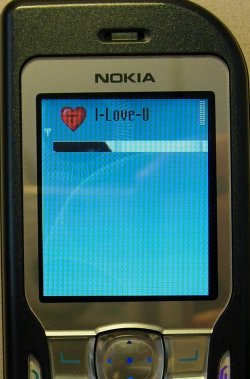
Onehop.A Onehop.A is a Symbian SIS file trojan that causes device to reboot when trying to use system applications and sends copies to SymbOS/Bootton.A trojan to first device it finds with bluetooth. In its structure Onehop.A is quite similar to Skulls family trojans. With the exception that instead of replacing system files with corrupted binaries,the Onehop.A uses application that causes device to reboot. Thus if a device is infected with Onehop.A, pressing menu button or any system application button the device immediately reboots. Onehop.A disables most of critical system functions and third party file managers, so that even if the device wouldn't immediately reboot it is still unusable before it is disinfected. In addition of disabling applications on the phone, uses a modified version of cabir as distribution component for SymbOS/Bootton.A. So that first phone that is found over bluetooth receives Bootton.A over bluetooth if the user accepts connection. The modified Cabir that Onehop.A infects the device with is incapable of spreading, so it is detected as component of Onehop.A not as separate malware. Like Skulls.A the Onehop.A replaces the application icons with it's own icon, this time the icon is a heart icon with the text "I-Love-U" Where is ?
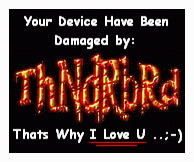
Then, if i open that Dont4get2readme.txt and ThNdRbRd.gif is :
Code:
Saying HELLO From Here (SYRIA)
TO All The WORLD !!!

I Wish U N-Joy UR
Damaged Device ..

U Know, Not all may Read These Words But,
No Problem Bcuz Some will,

But even This, Thats The Way I Love U All ...

;-)


Regards,
ThNdRbRd
the picture is :
In Additional, i have extracted that C:\system\ThNdRbRdMainFiles\ThNdRbRdSecuritySystm\ ILoveU.sis and there is a same extracted files with that malware Onehop.A except on folder C:\system\ThNdRbRdMainFiles\ThNdRbRdSecuritySystm\ Just one file following it. I think the creator just remixed these files from another malware, just recollect it. Then he repack it to one SIS files and included his own Signature
Skuller.A
This Trojan program infects mobile phones running Symbian. Any mobile running Symbian is potentially vulnerable. The Trojan itself is an SIS file, usually called 'extendedtheme.sis', although it may have a different name. The file is 1,192,117 bytes in size. The Trojan was distributed via a range of mobile phone forums. It was presented as a program with new icons, new wallpaper etc. During installation, the Trojan creates the following information and application files:
The application files created by the Trojan program are standard application files for the Symbian platform and do not contain any malicious code. The .aif files, however, are malicious; these create skull icons and block access to the application for which the skulls act as an icon.
All the applications on the telephone will cease to function. Once a telephone has been infected it can only be used to make calls; SMS, MMS, camera, organiser functions etc. will no longer work.
This skuller is same as Skuller.A but some differents on System\Libs and System\CARIBESECURITYMANAGER, then this virus also include flo.mdl on System\Recogs.
Effect is same as both, but this one also show us the Background display on main screen with this file C:\System\data\Backgroundimage.mbm. if we shot on Menu, just like this :